Problem Reductions
Problem Reductions is a Rust library and command-line tool for NP-hard problems and the reductions between them. Each problem is a model with a configuration space and an objective. Each reduction is a registered rule that maps an instance of one problem to an instance of another and maps solutions back. Searching the reduction graph yields a route from a problem to a solver, such as integer linear programming, with recovery of a solution to the original instance. The catalog currently holds:
218 problem families · 257 concrete variants · 344 directed reductions
- Atlas: every problem variant and reduction, with schemas and overheads
- Paper: definitions, constructions, and proofs
- Rust API: generated from source
This guide covers the pred CLI, the agent skills shipped with the repository, and the Rust library. Every page has a Markdown link for reading without a browser; the Markdown index lists all pages.
Cite
@misc{pan2026problemreductionsscaleagentic,
  title         = {Problem Reductions at Scale: Agentic Integration of Computationally Hard Problems},
  author        = {Xi-Wei Pan and Shi-Wen An and Jin-Guo Liu},
  year          = {2026},
  eprint        = {2604.11535},
  archivePrefix = {arXiv},
  primaryClass  = {cs.AI},
  url           = {https://arxiv.org/abs/2604.11535},
}
Research scope
The long-term goal is autonomous discovery of new reduction rules. Today the repository provides executable models, registered reductions, solver routing, and agent workflows for proposals, implementation, and review. A rule needs a mathematical argument as well as tests; passing finite examples does not establish a general proof.
Quick start
Install
cargo install problemreductions-cli
pred --version
Rust and a native build toolchain are required. ILP solving uses the bundled HiGHS backend.
The published crate may lag behind the catalog on this site. To build the current checkout:
git clone https://github.com/CodingThrust/problem-reductions
cd problem-reductions
cargo install --path problemreductions-cli
First solve
pred create MIS --graph 0-1,1-2,2-3,3-4,4-0 -o cycle.json
pred solve cycle.json
pred evaluate cycle.json --config '[true,false,true,false,false]'
MIS is Maximum Independent Set: select as many pairwise non-adjacent vertices as possible. The graph is a cycle on five vertices. solve executes the registered ILP pipeline and maps the solution back, reporting Max(2) with a configuration such as [true, false, true, false, false]. evaluate scores a configuration of your own against the same instance. Several optimal configurations exist, so the solver’s choice may differ from yours.
Terminal session
A recording of the real CLI: discover a route, transform the instance, solve, and check the result.
Open the player · Download the cast
pred path MIS ILP --json -o paths.json
python3 -c 'import json; print(json.dumps(json.load(open("paths.json"))["paths"][0]))' > path.json
pred create MIS --graph 0-1,1-2,2-3,3-4,4-0 -o cycle.json
pred reduce cycle.json --via path.json -o reduced.json
pred solve reduced.json
pred evaluate cycle.json --config '[true,false,true,false,false]'
pred solve cycle.json
path.json contains one explicitly selected route from the returned path set. reduced.json keeps the source instance and that route, so solving the bundle recovers a source solution. The final command solves the original file through its registered ILP pipeline. Both solves and the independent evaluation return Max(2); optimal solutions may differ.
Command reference
Every command accepts --json for structured output, -o FILE to save JSON, and -q to silence informational messages. pred <command> --help lists all flags; this page shows one example per command.
Catalog
pred list
pred show MIS
pred list --rules
list reports every problem with its aliases, variants, and reduction counts. show describes the resolved variant, its parameter fields, input schema, and incoming and outgoing reductions. Read that schema before constructing an instance.
Example: pred show MIS
MaximumIndependentSet/SimpleGraph/One
  Find maximum weight independent set in a graph
  Best Known Complexity: O(1.1996^num_vertices)

Inputs (2):
  graph (Vec<(usize,usize)>)
  num_vertices (usize) [optional]

Parameters (2):
  num_edges
  num_vertices

Outgoing reductions (6):
  → MaximumSetPacking/One  (num_sets <= num_vertices, universe_size <= num_edges)
  → MaximumIndependentSet/SimpleGraph/i64  (num_edges = num_edges, num_vertices = num_vertices)
  → MaximumIndependentSet/KingsSubgraph/One  (num_edges <= 11 * num_vertices^2, num_vertices <= 5 * num_vertices^2)
  → MaximumClique/SimpleGraph/One  (num_edges = -1 * num_edges + num_vertices * (-1 + num_vertices) * 2^-1, num_vertices = num_vertices)
  → MaximumIndependentSet/TriangularSubgraph/i64  (num_edges <= 108 * num_vertices + 108 * num_vertices^2, num_vertices <= 36 * num_vertices + 36 * num_vertices^2)
  → DecisionMaximumIndependentSet/SimpleGraph/One  (num_edges = num_edges, num_vertices = num_vertices)

Incoming reductions (5):
  MaximumSetPacking/One →  (num_edges <= num_sets^2, num_vertices <= num_sets)
  MaximumIndependentSet/UnitDiskGraph/One →  (num_edges = num_edges, num_vertices = num_vertices)
  LongestCommonSubsequence →  (num_edges <= cross_frequency_product^2, num_vertices <= cross_frequency_product)
  MaximumClique/SimpleGraph/One →  (num_edges = -1 * num_edges + num_vertices * (-1 + num_vertices) * 2^-1, num_vertices = num_vertices)
  DecisionMaximumIndependentSet/SimpleGraph/One →  (num_edges = num_edges, num_vertices = num_vertices)
Names and variants
pred show MIS/SimpleGraph/i64
pred path MIS/SimpleGraph/i64 ILP/bool
Aliases such as MIS resolve to full names, and a bare name selects the declared default variant: MIS is MaximumIndependentSet/SimpleGraph/One. Slash-separated parameters select graph, weight, or other variant values. One means unit weights; passing non-unit --weights to create upgrades a default instance to i64. Name the exact variant when a reproducible endpoint matters.
| Alias | Full Name |
|---|---|
2SAT | KSatisfiability |
3-Partition | ThreePartition |
3DM | ThreeDimensionalMatching |
3Partition | ThreePartition |
3SAT | KSatisfiability |
BCNF | BoyceCoddNormalFormViolation |
BCNFViolation | BoyceCoddNormalFormViolation |
CBM | ConsecutiveBlockMinimization |
CBQ | ConjunctiveBooleanQuery |
CMO | MaximumContactMapOverlap |
CVP | ClosestVectorProblem |
Clique | KClique |
D2CIF | DirectedTwoCommodityIntegralFlow |
DHP | DirectedHamiltonianPath |
DMIS | DecisionMaximumIndependentSet |
DMVC | DecisionMinimumVertexCover |
DOLA | DecisionOptimalLinearArrangement |
FAS | MinimumFeedbackArcSet |
FVS | MinimumFeedbackVertexSet |
HC | HamiltonianCircuit |
IndependentSet | DecisionMaximumIndependentSet |
KSAT | KSatisfiability |
LCS | LongestCommonSubsequence |
MAX2SAT | Maximum2Satisfiability |
MCC | MinimumCostCirculation |
MCES | MaximumCommonEdgeSubgraph |
MCMF | MinimumCostMaximumFlow |
MCPP | MixedChinesePostman |
MCST | MinimumCapacitatedSpanningTree |
MECF | MinimumEdgeCostFlow |
MGB | MinimumGraphBandwidth |
MIS | MaximumIndependentSet |
MVC | MinimumVertexCover |
MaxCMO | MaximumContactMapOverlap |
MaxMatching | MaximumMatching |
MaximumBipartiteSubgraph | MaxCut |
MinDNF | MinimumDisjunctiveNormalForm |
N3DM | Numerical3DimensionalMatching |
NAESAT | NAESatisfiability |
NMTS | NumericalMatchingWithTargetSums |
OCST | OptimumCommunicationSpanningTree |
OLA | OptimalLinearArrangement |
POK | PartiallyOrderedKnapsack |
QAP | QuadraticAssignment |
QBF | QuantifiedBooleanFormulas |
QDE | QuadraticDiophantineEquations |
RPP | RuralPostman |
SAT | Satisfiability |
SCS | ShortestCommonSupersequence |
SCSS | ShortestCommonSuperstring |
TSP | TravelingSalesman |
VC | DecisionMinimumVertexCover |
VertexCover | DecisionMinimumVertexCover |
WangTiling | SquareTiling |
X3C | ExactCoverBy3Sets |
pCenter | MinMaxMulticenter |
pmedian | MinimumSumMulticenter |
Paths
pred path MIS ILP
pred path MIS QUBO --limit 50
pred path MIS QUBO --json -o paths.json
pred from MIS --hops 2
pred to QUBO
path enumerates witness-capable simple routes between exact endpoints, without ranking. --limit accepts 1 through 999, or all for 999; the default is 20. JSON output contains paths and truncated. from and to explore outgoing and incoming neighbors.
Example: a multi-step path from Factoring to SpinGlass
Found 3 paths from Factoring to SpinGlass:

--- Path 1 ---
Path (3 steps): Factoring → CircuitSAT → DecisionSpinGlass/SimpleGraph/i64 → SpinGlass/SimpleGraph/i64

  Step 1: Factoring → CircuitSAT
    num_assignment_outputs <= 2 + 2 * (num_bits_first + num_bits_second) + 6 * num_bits_first * num_bits_second
    num_assignments <= 2 + 2 * (num_bits_first + num_bits_second) + 6 * num_bits_first * num_bits_second
    num_expression_nodes <= 5 * (2 + 2 * (num_bits_first + num_bits_second) + 6 * num_bits_first * num_bits_second)
    num_variables <= 1 + 2 * (num_bits_first + num_bits_second) + 6 * num_bits_first * num_bits_second

  Step 2: CircuitSAT → DecisionSpinGlass/SimpleGraph/i64
    num_interactions <= num_assignment_outputs + 6 * num_expression_nodes
    num_spins <= num_variables + 3 * num_expression_nodes

  Step 3: DecisionSpinGlass/SimpleGraph/i64 → SpinGlass/SimpleGraph/i64
    num_interactions = num_interactions
    num_spins = num_spins

  Overall:
    num_interactions <= 2 + 2 * (num_bits_first + num_bits_second) + 6 * num_bits_first * num_bits_second + 30 * (2 + 2 * (num_bits_first + num_bits_second) + 6 * num_bits_first * num_bits_second)
    num_spins <= 1 + 2 * (num_bits_first + num_bits_second) + 6 * num_bits_first * num_bits_second + 15 * (2 + 2 * (num_bits_first + num_bits_second) + 6 * num_bits_first * num_bits_second)

--- Path 2 ---
Path (6 steps): Factoring → CircuitSAT → Satisfiability → DecisionMaximum2Satisfiability → Maximum2Satisfiability → MaxCut/SimpleGraph/i64 → SpinGlass/SimpleGraph/i64

  Step 1: Factoring → CircuitSAT
    num_assignment_outputs <= 2 + 2 * (num_bits_first + num_bits_second) + 6 * num_bits_first * num_bits_second
    num_assignments <= 2 + 2 * (num_bits_first + num_bits_second) + 6 * num_bits_first * num_bits_second
    num_expression_nodes <= 5 * (2 + 2 * (num_bits_first + num_bits_second) + 6 * num_bits_first * num_bits_second)
    num_variables <= 1 + 2 * (num_bits_first + num_bits_second) + 6 * num_bits_first * num_bits_second

  Step 2: CircuitSAT → Satisfiability
    num_clauses <= 2 * num_assignment_outputs + 8 * num_expression_nodes
    num_literals <= 4 * num_assignment_outputs + 24 * num_expression_nodes
    num_vars <= num_variables + 2 * num_expression_nodes

  Step 3: Satisfiability → DecisionMaximum2Satisfiability
    num_clauses <= 10 * (num_literals + 3 * num_clauses)
    num_vars <= num_vars + 2 * num_literals + 4 * num_clauses

  Step 4: DecisionMaximum2Satisfiability → Maximum2Satisfiability
    num_clauses = num_clauses
    num_vars = num_vars

  Step 5: Maximum2Satisfiability → MaxCut/SimpleGraph/i64
    num_edges <= (1 + num_vars)^2
    num_vertices <= 1 + num_vars

  Step 6: MaxCut/SimpleGraph/i64 → SpinGlass/SimpleGraph/i64
    num_interactions = num_edges
    num_spins = num_vertices

  Overall:
    num_interactions <= 1 + 2 * (1 + 2 * (num_bits_first + num_bits_second) + 6 * num_bits_first * num_bits_second + 426 * (2 + 2 * (num_bits_first + num_bits_second) + 6 * num_bits_first * num_bits_second)) + (1 + 2 * (num_bits_first + num_bits_second) + 6 * num_bits_first * num_bits_second + 426 * (2 + 2 * (num_bits_first + num_bits_second) + 6 * num_bits_first * num_bits_second))^2
    num_spins <= 2 + 2 * (num_bits_first + num_bits_second) + 6 * num_bits_first * num_bits_second + 426 * (2 + 2 * (num_bits_first + num_bits_second) + 6 * num_bits_first * num_bits_second)

--- Path 3 ---
Path (6 steps): Factoring → CircuitSAT → Satisfiability → NAESatisfiability → DecisionMaxCut/SimpleGraph/i64 → MaxCut/SimpleGraph/i64 → SpinGlass/SimpleGraph/i64

  Step 1: Factoring → CircuitSAT
    num_assignment_outputs <= 2 + 2 * (num_bits_first + num_bits_second) + 6 * num_bits_first * num_bits_second
    num_assignments <= 2 + 2 * (num_bits_first + num_bits_second) + 6 * num_bits_first * num_bits_second
    num_expression_nodes <= 5 * (2 + 2 * (num_bits_first + num_bits_second) + 6 * num_bits_first * num_bits_second)
    num_variables <= 1 + 2 * (num_bits_first + num_bits_second) + 6 * num_bits_first * num_bits_second

  Step 2: CircuitSAT → Satisfiability
    num_clauses <= 2 * num_assignment_outputs + 8 * num_expression_nodes
    num_literals <= 4 * num_assignment_outputs + 24 * num_expression_nodes
    num_vars <= num_variables + 2 * num_expression_nodes

  Step 3: Satisfiability → NAESatisfiability
    num_clause_variables <= num_clauses + num_literals
    num_clauses = num_clauses
    num_literal_pairs <= num_clauses + num_literals * (1 + num_literals) * 2^-1
    num_literals <= num_literals + 2 * num_clauses
    num_vars = 1 + num_vars

  Step 4: NAESatisfiability → DecisionMaxCut/SimpleGraph/i64
    num_edges <= num_vars + -7 * num_clauses + 4 * num_literals
    num_vertices <= 2 * (num_literals + num_vars + -2 * num_clauses)

  Step 5: DecisionMaxCut/SimpleGraph/i64 → MaxCut/SimpleGraph/i64
    num_edges = num_edges
    num_vertices = num_vertices

  Step 6: MaxCut/SimpleGraph/i64 → SpinGlass/SimpleGraph/i64
    num_interactions = num_edges
    num_spins = num_vertices

  Overall:
    num_interactions <= 2 + 2 * (num_bits_first + num_bits_second) + 6 * num_bits_first * num_bits_second + 842 * (2 + 2 * (num_bits_first + num_bits_second) + 6 * num_bits_first * num_bits_second)
    num_spins <= 2 * (2 + 2 * (num_bits_first + num_bits_second) + 6 * num_bits_first * num_bits_second + 10 * (2 + 2 * (num_bits_first + num_bits_second) + 6 * num_bits_first * num_bits_second)) + 416 * (2 + 2 * (num_bits_first + num_bits_second) + 6 * num_bits_first * num_bits_second)
Parameter transforms declare exact equalities, upper bounds, or unavailable relations. A discovered route does not imply the target is cheap to solve; inspect the constructed target on representative instances.
Create
pred create MIS --graph 0-1,1-2,2-3 -o problem.json
pred create MIS/SimpleGraph/i64 --graph 0-1,1-2,2-3 --weights 2,1,3,1 -o weighted.json
pred create --example MVC/SimpleGraph/i64 --to MIS/SimpleGraph/i64 -o source.json
pred create MIS --random --num-vertices 10 --edge-prob 0.3 --seed 42 -o random.json
Flags follow the schema field names in kebab-case: universe_size becomes --universe-size. Vertices use zero-based indices and --graph is a comma-separated edge list. --example loads a canonical model fixture, or with --to the source side of a documented reduction example (--example-side target for the other side). --random generates a graph instance; save the JSON so the instance can be reproduced.
Other input structures:
pred create SAT --num-vars 3 --clauses '1,2;-1,3' -o sat.json          # signed one-based literals; ';' separates clauses
pred create QUBO --matrix '1,1;0,2' -o qubo.json                    # ';' separates rows
pred create X3C --universe-size 6 --subsets '0,1,2;3,4,5;0,3,4' -o x3c.json
pred create Factoring --target 6 --m 2 --n 2 -o factoring.json
Inspect and evaluate
pred inspect problem.json
pred evaluate problem.json --config '[true,false,true,false]'
pred create MIS --graph 0-1,1-2,2-3 | pred evaluate - --config '[true,false,true,false]'
inspect reports the resolved variant and sizes of a problem file or reduction bundle. evaluate scores one configuration: selecting vertices 0 and 2 returns Max(2), while selecting adjacent vertices returns Max(None). Configurations follow each problem’s variable domains and are not always binary. - reads from stdin.
For a problem file, JSON inspection includes parameter_values, the model’s actual named instance parameters. These are separate from the parameters list of parameter names.
Reduce
pred create DecisionMinimumVertexCover --graph 0-1,1-2,0-2 --weights 1,1,1 --bound 2 -o decision-mvc.json
pred path DecisionMinimumVertexCover MinimumVertexCover --json -o paths.json
python3 -c 'import json; print(json.dumps(json.load(open("paths.json"))["paths"][0]))' > path.json
pred reduce decision-mvc.json --via path.json --aggregate -o reduced.json
pred extract reduced.json --value 2
pred extract reduced.json --config '[true,true,false]' -o source-solution.json
pred reduce decision-mvc.json --via path.json --aggregate | pred extract - --value 2
The bundle contains the source instance, the target instance, and the variant-level path; keep it whole to preserve solution recovery. --via replays one route extracted from the paths envelope, whose source variant must match the input.
extract calls the reduction rules’ existing mappings. Supply exactly one input:
--config: a target configuration, passed throughextract_solutionin reverse path order. Returns the source configuration and its evaluation.--value: a completed target aggregate, passed throughextract_valuein reverse path order. Returns the mapped source value, without a witness.
For example, the rule from DecisionMinimumVertexCover with bound 1 to
MinimumVertexCover maps target optimum 2 to source value false.
Its witness mapping cannot produce a cover of size at most 1 from a two-vertex
cover; that mapping returns an error. These are the rule’s two distinct contracts.
The triangle above has minimum cover size 2, so both extractions certify YES.
--value takes raw JSON such as 2, true, or null, without wrappers such as
Min(2). Extraction requires no status, runs no solver, and does not
prove that a supplied aggregate is complete or optimal. Unsupported mappings and
malformed inputs are errors. pred solve reduced.json still handles completed
solver results internally.
Aggregate-only paths can be constructed with pred reduce --aggregate and
recovered with pred extract --value through AggregateReductionChain::extract_value.
Solve
pred solve problem.json
pred solve problem.json --solver brute-force
pred solve reduced.json --timeout 30 --json
| Solver | Behavior |
|---|---|
ilp | Executes the exact variant’s registered fixed ILP pipeline and recovers its source solution |
brute-force | Enumerates all configurations; for tiny instances and cross-checks |
customized | Exact structure-exploiting backends for selected models; see pred solve --help |
Default dispatch tries registered customized, ILP, then brute-force capabilities in that order. pred inspect lists the capabilities available for the exact variant. Solving a bundle solves its target and maps the result back; every successful solve returns a solution. A discovered path does not by itself provide a registered solver. Evaluate the returned solution on the original instance to verify its value.
JSON and pipes
pred create MIS --graph 0-1,1-2,2-3 | pred reduce - --via path.json | pred solve - --json
pred export-graph -o reduction_graph.json
Check the exit status before consuming a result, and enable set -o pipefail in scripts. Keep type and variant with each instance; an alias alone does not identify an exact endpoint. The site publishes reduction_graph.json and problem_schemas.json from the same registry; the local export-graph describes the installed version.
Shell completions
eval "$(pred completions bash)"        # ~/.bashrc
eval "$(pred completions zsh)"         # ~/.zshrc
pred completions fish | source         # ~/.config/fish/config.fish
Without an argument, pred completions detects the current shell.
Skills
Skills are task procedures under .claude/skills/<name>/SKILL.md in the repository. An agent reads one and follows it, using the pred CLI for current model, variant, and path data. They work with Claude Code as slash commands (/find-solver) and with any agent that can read files.
Setup
git clone https://github.com/CodingThrust/problem-reductions
cd problem-reductions
make cli
This installs pred into Cargo’s binary directory. Give the agent this context:
Work in this repository. Read AGENTS.md and .claude/CLAUDE.md.
Use the built pred CLI to inspect current models, variants, and paths.
Read the SKILL.md for the task before following its workflow.
Report the exact model variant, commands, results, and unresolved assumptions.
Every skill is invoked the same way. Name the skill, then describe the task:
Read .claude/skills/find-solver/SKILL.md and follow it.
My problem: [inputs, constraints, and objective].
Typical size: [counts and ranges].
Use the atlas
| Skill | What it produces |
|---|---|
find-solver | Matches a real-world problem to a library model, explores reduction routes, and recommends solvers. Writes a solution document to docs/solutions/. |
find-problem | The reverse: given a solver for one model, lists the source problems it can handle through incoming reductions, ranked by effective complexity. |
Ask the agent to construct a small instance, solve it, and evaluate the recovered configuration on the original problem before scaling up. A solver for a target handles sources that reduce to it; a route in the other direction establishes nothing.
Contribute
| Skill | What it produces |
|---|---|
propose | Turns a definition or a candidate source-to-target connection into a precise proposal and files a GitHub issue. |
The remaining workflow has no queue or project board. Point an agent at an issue (“implement #42”) and it follows these guides on its own:
| Guide | Covers |
|---|---|
how-to-triage-issue | Quality check of [Model] and [Rule] issues: usefulness, non-triviality, literature, completeness, writing. Fixes mechanical problems and discusses substantive ones. |
how-to-code | Adding a problem model or reduction rule: source, variants, tests, canonical example. |
how-to-verify | Certifying a rule: type check, Typst proof, and a constructor and an adversary script with thousands of independent checks, posted as a verification certificate on the pull request. Also reduction-graph topology checks. |
how-to-write-manual | Writing or auditing entries in the Typst manual and these docs. |
how-to-review | Fresh-context review of a pull request: structural check, quality check, and a feature test through pred. |
how-to-ship | From issue to a merge-ready pull request: gates, review, CI, review comments, and coverage. A maintainer merges. |
For a rule, distinguish a construction supported by literature from a new conjecture, and record proof gaps and counterexamples explicitly.
A passing test suite is evidence for the tested instances, not a proof for all inputs. Keep the mathematical argument, the constructor and adversary checks, closed-loop tests, and review findings with the work.
Maintain
| Skill | What it produces |
|---|---|
release | Checks the tree, proposes the version bump, and tags a release after confirmation. |
dev-setup | Installs and configures the development tools. |
update-papers | Downloads referenced papers and regenerates the collection index. |
Reading without a browser
The Markdown index lists every page of this guide with code includes expanded. reduction_graph.json and problem_schemas.json provide the registry as structured data.
Authorship
Contributors of ten non-trivial reduction rules are added to the author list of the paper. The software is MIT licensed.
Getting started
cargo add problemreductions
The library includes the HiGHS ILP backend.
Solve a small instance
use problemreductions::prelude::*;

fn main() {
    let problem = MaximumSetPacking::<i64>::new(vec![
        vec![0, 1], vec![1, 2], vec![2, 3], vec![4, 5],
    ]);
    let solver = BruteForce::new();
    let solution = solver.solve(&problem).unwrap().unwrap();
    println!("{:?}: {}", solution, problem.evaluate(&solution).unwrap());
}
The optimal packing selects sets 0, 2, and 3: the witness is [true, false, true, true] and evaluates to Max(3). Problem::evaluate scores a configuration; BruteForce enumerates the configuration space, so keep exhaustive examples small.
Apply a reduction
Reduce the same instance to binary ILP, solve the target, and recover the original configuration:
use problemreductions::prelude::*;
use problemreductions::models::algebraic::ILP;
use problemreductions::solvers::ILPSolver;

fn main() {
    let problem = MaximumSetPacking::<i64>::new(vec![
        vec![0, 1], vec![1, 2], vec![2, 3], vec![4, 5],
    ]);
    let reduction = ReduceTo::<ILP<bool>>::reduce_to(&problem).unwrap();
    let target = reduction.target_problem();
    assert_eq!(target.num_vars(), 4);
    assert_eq!(target.num_constraints(), 2);

    let target_solution = ILPSolver::new().solve(target).unwrap();
    let solution = reduction.extract_solution(&target_solution).unwrap();
    assert_eq!(solution, vec![true, false, true, true]);
    println!("{}", problem.evaluate(&solution).unwrap()); // Max(3)
}
The target has one binary variable per set and a constraint for each element shared by multiple sets. extract_solution maps a target solution back to the source solution type. ILPSolver::new().solve(&problem) executes the exact variant’s registered ILP pipeline and returns its source solution.
Discover and run a path
Search uses exact variants. This discovers a route from Factoring to SpinGlass and executes it:
use problemreductions::models::algebraic::ILP;
use problemreductions::prelude::*;
use problemreductions::rules::{ReductionGraph, ReductionMode};
use problemreductions::solvers::ILPSolver;
use problemreductions::topology::SimpleGraph;
    let graph = ReductionGraph::new(); // all registered reductions
    let src_var = ReductionGraph::variant_to_map(&Factoring::variant()); // {} (no variant params)
    let dst_var = ReductionGraph::variant_to_map(&SpinGlass::<SimpleGraph, f64>::variant()); // {graph: "SimpleGraph", weight: "f64"}
    let paths = graph.find_all_paths_mode(
        "Factoring",
        &src_var,
        "SpinGlass",
        &dst_var,
        ReductionMode::Witness,
    );
    let rpath = paths
        .iter()
        .find(|path| {
            path.type_names() == ["Factoring", "CircuitSAT", "DecisionSpinGlass", "SpinGlass"]
        })
        .expect("explicit Factoring -> CircuitSAT -> SpinGlass route");
    println!("  {}", rpath);
    let factoring = Factoring::with_factor_bits(
        6, // target_product:  find p × q = 6
        2, // num_bits_first:  p is a 2-bit factor
        2, // num_bits_second: q is a 2-bit factor
    );

let reduction = graph.reduce_along_path(rpath, &factoring).unwrap().unwrap();
let target: &SpinGlass<SimpleGraph, f64> = reduction.target_problem();
// Solve `target`, then call reduction.extract_solution(&target_solution).
extract_solution walks the intermediate mappings in reverse. The full example also solves factoring through a direct ILP reduction and checks that the recovered factors multiply to 6:
cargo run --example chained_reduction_factoring_to_spinglass
Solver contracts
| API | Result | Scope |
|---|---|---|
BruteForce::solve | Result<Option<P::Solution>, SolveError> | Registered finite search spaces; None proves infeasibility |
ILPSolver::solve | Result<P::Solution, ILPSolveError> | Exact variants with registered ILP pipelines |
Every successful solve returns the problem’s Solution. Evaluate it against the source with Problem::evaluate, which returns Result<P::Value, EvaluationError>. Path discovery enumerates routes; it does not rank them or register a solver capability. See the solver API.
API reference
The API is generated from Rust source with rustdoc. Start with models, reduction contracts, or solvers.
Run make doc to build the guides and API locally. For short runnable examples, see getting started.
Design
This guide covers the library internals for contributors.
See Numeric types and arithmetic before choosing numeric fields or implementing arithmetic in a model or reduction.
Module Architecture
| Location | Responsibility | Depends on |
|---|---|---|
src/traits.rs, src/types.rs, src/variant.rs, src/topology/ | Core: the Problem trait, aggregate values, variant parameters, graph types | — |
src/models/ | Models grouped by graph, formula, set, algebraic, or miscellaneous input | Core |
src/rules/ | Reduction implementations and solution/value mappings | Models |
src/registry/ | Concrete variant metadata and dynamic dispatch | Rules |
src/solvers/ | Exhaustive, ILP, specialized, and decision-search solvers | Core |
src/io.rs, src/expr.rs | JSON serialization and overhead expressions | Core |
src/example_db/ | Canonical model and rule examples | Models, rules |
src/unit_tests/ | Tests mirroring the source tree | Everything |
problemreductions-cli/ | The pred CLI | The library |
Problem Model
Every problem implements Problem. The associated Value type is the per-configuration aggregate returned by evaluate(). Solvers fold these values across the configuration space, and witness-capable aggregates can also recover representative configurations.
trait Problem: Clone {
    const NAME: &'static str;              // e.g., "MaximumIndependentSet"
    type Solution;                         // e.g., Vec<bool>, permutation, tuple
    type Value: Clone;                     // e.g., Max<i64>, Or, Sum<i64>
    fn parameter_names() -> &'static [&'static str];
    fn parameters(&self) -> ProblemParameters;
    fn evaluate(&self, solution: &Self::Solution) -> Result<Self::Value, EvaluationError>;
    fn variant() -> Vec<(&'static str, &'static str)>; // e.g., [("graph", "SimpleGraph"), ("weight", "i64")]
    fn problem_type() -> ProblemType;      // default: registry lookup by NAME
}Problem— the base trait. Every problem declares a mathematicalSolutiontype, evaluates that type directly, and reports its canonical instance parameters. For example, a 4-vertex MIS usesVec<bool>;evaluate(&[true, false, true, false])returnsOk(Max(Some(2)))if vertices 0 and 2 form an independent set, orOk(Max(None))if they share an edge. Inherent getters such asnum_vertices()andnum_edges()supply the named parameters used by reduction expressions.BruteForceProblem— the reference-solver capability for registered variants with a finite Cartesian coordinate space. Itsdimensions()method and the Cartesian iterator belong to the brute-force solver, not to the mathematicalProblemcontract.- Objective problems — typically use
Max<V>,Min<V>, orExtremum<V>asValue. - Feasibility problems — typically use
Or. - Solve contract — a successful solve always returns the problem’s
Solution; a global count or statistic without a representative solution is not aProblemsolve. - Common aggregate wrappers —
Max<V>,Min<V>,Sum<W>,Or,And,Extremum<V>,ExtremumSense.
Construction inputs
VariantEntry::inputs() describes the values a concrete constructor accepts.
Models with a separate construction specification supply CreateSpec::inputs();
direct constructors use their declared fields. CLI creation, MCP creation, and
pred show use this contract. Model-level
catalog fields describe the model family; they are not a concrete variant’s input
schema. show exposes concrete inputs in JSON and labels them Inputs in text.
Unit-valued data are implicit in One variants. For example, MVC/One accepts a
graph, while MVC/i64 also accepts vertex weights. Constructors derive unit-vector
lengths from the graph, set family, or task deadlines. Internal Vec<One> storage
and persisted instance JSON remain independent of construction inputs. Supplying
an undeclared weight or length input is an error, even when every value is one.
Decision<P> composes the registered inputs of P with an objective bound and
calls P’s registered constructor before wrapping the result. It does not repeat
the inner input schema or deserialize construction inputs as persisted model JSON.
Numeric types and arithmetic
Numeric formats are selected by semantic role:
usizerepresents in-memory indices, collection lengths, and brute-force dimensions;u64represents public problem parameters and the input/output values of reduction parameter expressions;i64represents signed mathematical integers;boolrepresents Boolean variables; and- finite
f64represents real or rational values when an approximate representation is part of the model contract.
usize is not a portable serialized parameter format, and u64 is not an index or
general-purpose replacement for a model’s mathematical integer domain.
Another numeric format requires sufficient justification from the mathematical
problem or target schema. Required exceptions include BigUint in Factoring,
SubsetSum, SubsetProduct, QuadraticCongruences, and
QuadraticDiophantineEquations, where arbitrary precision is part of the
problem, and One in unweighted variants, where the type represents the
unit-weight domain. Implementation convenience is not sufficient justification.
There is no i32 model or I/O numeric format.
This contract applies only at model, result, reduction-target, and external I/O
boundaries; implementation-local values are outside its scope. For example,
SpinGlass couplings and its objective result use i64, while the temporary
{−1, +1} spin values used inside evaluate() need not. A reduction’s
temporary calculations are also outside the contract, but numeric fields
written into its target model must follow the target model’s numeric format.
Weight variants are One, i64, and f64, with One ⊂ i64 ⊂ f64.
i64 → f64 is a fallible reduction using a checked conversion in
±(2^53-1), not as f64.
Arithmetic
- Keep arithmetic in the declared type. Exact values use checked
i64operations; approximate values use finitef64operations. - Constructors and reductions reject an arithmetic step that would overflow
i64when producing a stored field. They do not cap every magnitude at2^53-1.evaluate()never widens, wraps, saturates, or silently approximates. - Do not promote an
i64calculation toi128,BigInt, orBigUintto accept a larger instance.
Boundaries
- Use
Fromonly for value-preserving conversions andTryFromwhen range, sign, or domain can change. Do not useasfor model-derived values. - Converting a registered parameter getter from
usizetou64is an internal invariant ofProblem::parameters(), not a recoverable construction error. A valid instance’s registered parameters must already fitu64; the implementation checks this conversion to prevent silent truncation. - Symbolic parameter evaluation may use arbitrary-precision integers for local
intermediate arithmetic, but a materialized
ProblemParametersmust fitu64. - An
i64tof64conversion is explicit and fallible: it succeeds only for|value| ≤ 2^53-1. Use one shared helper at weight casts, solver adapters, and other exact-to-float hubs. - A lattice-to-
UnitDiskGraphreduction converts coordinates fallibly and rejects a storedf64geometry that would change source adjacency. - Rust constructors keep
i64fields asi64. CLI and MCP JSON encoding of ani64with|value| > 2^53-1errors; there is no string encoding and no clamping.
Variant System
A single problem name like MaximumIndependentSet can have multiple
variants. Each variant is identified by dimension-value pairs such as
{graph: "SimpleGraph", weight: "i64"}. Concrete variants are registered
nodes in the reduction graph, and explicit reduction rules connect them.
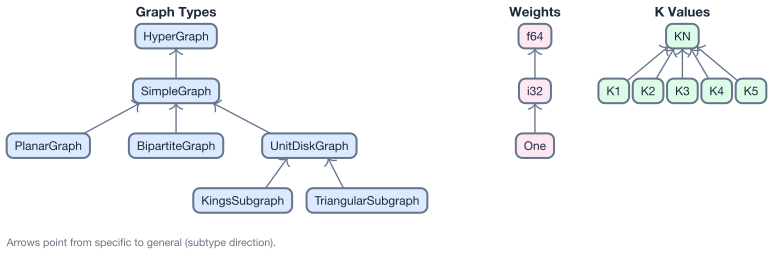
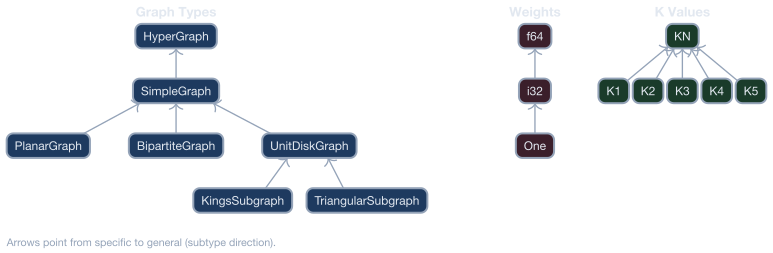
Variant types fall into three categories:
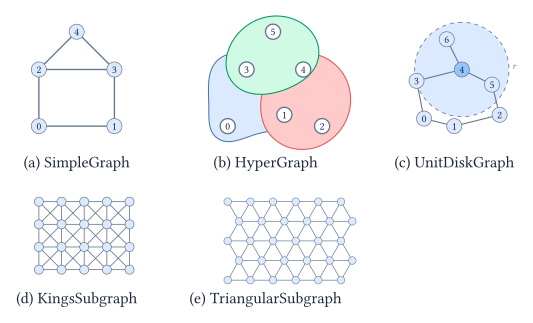
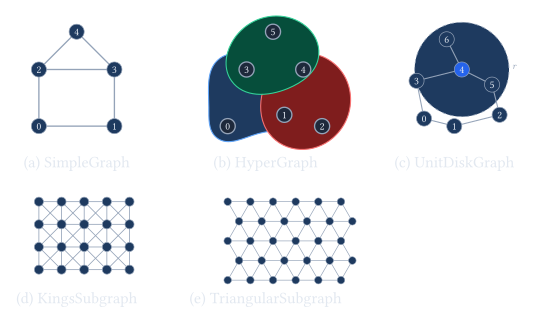
- Graph type —
SimpleGraph,PlanarGraph,BipartiteGraph,UnitDiskGraph,KingsSubgraph,TriangularSubgraph. - Weight type —
One(unweighted),i64,f64. - K value — e.g.,
K3for 3-SAT,KNfor arbitrary K.
Implementation details: VariantParam trait and macros
VariantParam trait
Each reusable variant parameter type implements VariantParam, which declares
its category and value:
pub trait VariantParam: 'static {
    const CATEGORY: &'static str;     // e.g., "graph", "weight", "k"
    const VALUE: &'static str;        // e.g., "SimpleGraph", "i64"
}
Registration with impl_variant_param!
The impl_variant_param! macro implements VariantParam and optionally
KValue for a type:
impl_variant_param!(SimpleGraph, "graph");

impl_variant_param!(KN, "k", k: None);

impl_variant_param!(K3, "k", k: Some(3));
Explicit variant reductions
impl_variant_reduction! registers a concrete same-model conversion with an
exact parameter transform and identity witness extraction:
impl_variant_reduction!(
    MaximumIndependentSet,
    <UnitDiskGraph, i64> => <SimpleGraph, i64>,
    fields: [num_vertices, num_edges],
    |src| MaximumIndependentSet::new(
        SimpleGraph::new(
            src.num_vertices(),
            Graph::edges(src.graph()),
        ),
        src.weights().to_vec())
);
Composing Problem::variant()
The variant_params! macro composes the Problem::variant() body from type parameter names:
// MaximumIndependentSet<G: VariantParam, W: VariantParam>
fn variant() -> Vec<(&'static str, &'static str)> {
    crate::variant_params![G, W]
    // e.g., MaximumIndependentSet<UnitDiskGraph, One>
    //     -> vec![("graph", "UnitDiskGraph"), ("weight", "One")]
}
Querying one variant family
ReductionGraph::variants_for(name) returns every registered concrete variant
of a problem. ReductionGraph::outgoing_reductions(name) returns their outgoing
edges. Filtering those edges by target_name == name produces the directed
relations within that variant family.
Reduction Rules
Mathematical contract
A single-instance reduction from A to B constructs a legal target instance F(x) and recovers a correct source answer G(x, y) from any correct target answer y. F and G run in polynomial time in their encoded inputs.
“Correct answer” means YES/NO, a valid witness, an optimal solution, or a total count, according to the problem; infeasibility must be represented explicitly or excluded from the legal domain. All optimal target solutions, including ties, must recover optimal source solutions. Equal objective values and one-to-one witness mappings are not required. See result mappings.
Turing reductions allow multiple adaptive queries: P → Decision<P> uses binary
search over the decision bound.
Witness-mapping implementation
A witness-mapping reduction uses two pieces: a result struct and a ReduceTo<T> impl.
The result struct holds the target problem and the logic to map solutions back:
#[derive(Debug, Clone)]
pub struct ReductionISToVC<W> {
    target: MinimumVertexCover<SimpleGraph, W>,
}

impl<W: WeightElement + VariantParam> ReductionResult for ReductionISToVC<W> {
    type Source = MaximumIndependentSet<SimpleGraph, W>;
    type Target = MinimumVertexCover<SimpleGraph, W>;

    fn target_problem(&self) -> &Self::Target { &self.target }
    fn extract_solution(
        &self,
        target_sol: &Vec<bool>,
    ) -> crate::rules::ExtractionResult<Vec<bool>> {
        crate::rules::traits::validate_target_solution(self.target_problem(), target_sol)?;
        Ok(target_sol.iter().map(|&x| !x).collect())
    }
}
Solution extraction contract
ReductionResult::extract_solution accepts one complete target configuration
and returns the source configuration defined by the reduction. Extraction is a
fallible boundary, not a recovery mechanism:
- In every direct extractor, validate once before indexing or decoding.
Use
validate_target_solution()when decoding needs the evaluated value. Usevalidate_target_witness(target, solution, certifies_source, message)when the target must certify a source witness. It evaluates once, applies the supplied predicate, and returnsExtractionErroron rejection. Keep the rule’s feasibility check or value-map threshold in that predicate. Composed extractors delegate this check. - For decision sources, reject an infeasible target value or a failed rule-owned feasibility threshold. Validate structure required by the inverse mapping, such as exactly-one blocks, permutations, paths, flows, or schedules.
- Apply the reduction’s mathematical inverse once and return a source configuration with the required length and domains.
- Return
ExtractionErrorwhen a precondition is not satisfied.
Do not truncate or pad input, substitute zero for missing data, select the first of several invalid candidates, retry with another mapping, or panic on caller-provided configuration data. Empty and singleton instances should flow through the same mathematical mapping unless the reduction itself has a genuine mathematical case distinction.
Zero and sentinel values remain valid when the source model explicitly gives
them meaning. For example, MaximumCommonEdgeSubgraph includes an “unmapped”
sentinel in its source dimensions. Missing target data must never be
interpreted as that sentinel.
Each conditional in an extractor should therefore either reject a named invariant violation or implement a case in the reduction’s mathematics. A normal extractor has one validation phase followed by one decoding phase; it does not accumulate compatibility or fallback branches.
The #[reduction] attribute on the ReduceTo<T> impl registers the reduction in the global registry (via inventory):
#[reduction(transform = exact {
    num_vertices = "num_vertices",
    num_edges = "num_edges",
})]
impl ReduceTo<MinimumVertexCover<SimpleGraph, i64>>
    for MaximumIndependentSet<SimpleGraph, i64>
{
    type Result = ReductionISToVC<i64>;
    fn reduce_to(&self) -> Result<Self::Result, crate::rules::ReductionError> { /* ... */ }
}
Model size and algorithm limits
Model parameters describe representable input sizes, not a requirement that the number of candidate solutions fit a machine integer. ClosestSubstring and MinimumDiscretePlanarInverseKinematics bound their products of choice counts by the arithmetic mean raised to the number of choices. Database frequency-table consistency uses the largest attribute domain to bound assignment counts. These are complexity upper bounds, not exact per-instance candidate counts.
Database ILP indicator counts and allocation limits are checked when constructing that reduction, not when loading the source model. Source input invariants and its witness representation remain model constraints.
Reduction Graph
Result mappings
Rules follow mathematical contracts, without mandatory category tags.
When a target asks whether an objective meets a bound, construct Decision<P>:
the target owns the bound and evaluates the predicate; the rule only decodes
YES witnesses and maps completed Or answers identically.
| Reduction | Completed-result workflow | Example |
|---|---|---|
| Decision → decision | Map Or identically; decode a witness only for YES. | SAT → 3-SAT |
| Optimization → optimization | Decode an optimal target witness and evaluate it on the source. Register extract_value only when the rule supplies an objective map. | MinimumVertexCover → MaximumIndependentSet |
| Decision → optimization | Apply the rule’s threshold or feasibility map to the exact target optimum. Decode only when it yields YES; return NO without a witness otherwise. | HamiltonianCircuit → TravelingSalesman: optimum cost equals the number of vertices |
| Counting | Fold all target evaluations, then map the total with extract_value; no representative witness. Witness equivalence alone does not preserve counts. | Parsimonious circuit → formula encoding with uniquely determined auxiliary values |
| Universal | Fold with And, then apply the rule’s aggregate map; no representative witness. | Renaming the variables of a universally quantified formula |
Use ReduceTo<T> and ReductionResult::extract_solution for witnesses.
When the same construction also maps completed values, implement
AggregateReductionResult on its result with #[aggregate_reduction].
The attribute registers the implementation, not a rule category; the implementation
owns the mathematical map. Use register_aggregate_reduction!(ResultType) to
register concrete instances of generic implementations, including
VariantReductionResult<S, T>. Both mappings
belong to the same graph edge and share its constructed result. Aggregate-only
rules use ReduceToAggregate<T>.
Common maps use an empty implementation:
#[aggregate_reduction(identity)]
impl AggregateReductionResult for ReductionSATToKSAT<K3> {}

#[aggregate_reduction(ilp_feasibility)]
impl AggregateReductionResult for ReductionNAESATToILP {}
The shorthand reuses the ReductionResult source, target, and target accessor.
identity returns the value unchanged; ilp_feasibility returns
Or(value.value.is_some()). Custom maps keep their explicit implementation.
Generic shorthand implementations still need register_aggregate_reduction!
for each concrete variant.
ReductionChain::extract_result() recovers completed results using the same
library implementation as fixed ILP pipelines. Recovery borrows intermediate
instances from the executed chain and requires each extracted witness to
realize its mapped aggregate.
Every witness reduction must construct a feasible target whenever the source
is feasible. Established target infeasibility therefore implies source
infeasibility, without a witness or a value map. This also applies when an
intermediate problem is proved infeasible by its completed-value map.
For feasible targets, reverse the chain one edge at a time using the required
witness and value mappings. Missing required maps, failed extraction, and
solver errors are errors, never proof of infeasibility. Completed-result
recovery follows the selected solver’s contract, including its numerical
tolerances. A witness-only solver API cannot return a witness for a negative
decision result and reports that limitation explicitly. These rules do not
change Problem, SolutionAggregate, or solver return types.
ReductionGraph::new() reads reduction_entries(), which joins each construction
with its registered result mappings, and builds a variant-level directed graph:
- Nodes are unique
(problem_name, variant)pairs — e.g.,("MaximumIndependentSet", {graph: "KingsSubgraph", weight: "i64"}). - Edges come from explicit
#[reduction]registrations, including cross-problem and same-problem variant reductions.
Exported files:
- reduction_graph.json — all problem variants and reduction edges
- problem_schemas.json — field definitions for each problem type
These JSON assets are generated during make doc, make mdbook, and make paper; they are build artifacts, not committed source files.
Generate them manually with cargo run --example export_graph and cargo run --example export_schemas when you need the raw exports locally.
Path finding
All path-finding operates on exact variant nodes. Use ReductionGraph::variant_to_map(&T::variant()) to convert a Problem::variant() into the required BTreeMap<String, String>.
| Method | Algorithm | Use case |
|---|---|---|
find_all_paths(src, src_var, dst, dst_var) | All simple paths | Enumerate every route |
compose_path_parameter_transform(path) | Symbolic composition | Compose each rule’s exact or upper-bound parameter relation while preserving its promise |
Each formula has its own relation: exact equality or upper bound. Composition preserves exactness when the formula and its required inputs are exact. Bounded inputs require sound upper-bound substitution. Unavailable fields affect only formulas that depend on them; independent formulas survive. Concrete-instance measurement remains a separate execution API.
Example: Finding a path from MIS{KingsSubgraph, i64} to VC{SimpleGraph, i64}:
MIS{KingsSubgraph,i64} -> MIS{UnitDiskGraph,i64} -> MIS{SimpleGraph,i64} -> VC{SimpleGraph,i64}
    variant reduction        variant reduction              reduction
Executable paths
Execute an explicitly selected path with ReductionGraph::reduce_along_path:
let reduction = graph.reduce_along_path(rpath, &factoring_instance)?.unwrap();
let target: &SpinGlass<SimpleGraph, f64> = reduction.target_problem();
let source_solution = reduction.extract_solution(&target_solution)?;
The returned ReductionChain stores each intermediate reduction and extracts the source solution by applying the inverse mappings in reverse order. Construction returns ReductionError; extraction returns ExtractionError.
Parameter contracts
Each reduction classifies every target parameter exactly once as exact, upper bound, or
unavailable with a reason. Every formula uses only registered source parameters on its RHS.
The guarantee describes the target built by the registered implementation. Derive it by
counting construction blocks, including early returns, skipped rows, repeated terms, and
normalization. Prefer a simple algorithmic upper bound; use exact only when equality holds
for every accepted input. Existing examples check the derivation but do not prove it.
Target structural relationships may justify a formula, but source expressions must be
substituted before registration; there is no automatic model-level inference. The #[reduction] macro parses every formula into
the canonical Expr DAG at compile time:
#[reduction(
transform = upper_bound {
    num_vars = "num_vertices + num_edges",
    num_clauses = "3 * num_edges",
},
unavailable = {
    encoding_bits = "coefficient magnitudes are not tracked",
},
})]
impl ReduceTo<Target> for Source { ... }
Rules can mix accuracy explicitly while existing uniform declarations remain supported:
#[reduction(transform = {
    exact { num_vars = "num_vars" },
    upper_bound { num_quadratic_terms = "num_vars * (num_vars - 1) / 2" },
})]
impl ReduceTo<Decision<QUBO<i64>>> for KSatisfiability<K2> { ... }
Here both RHS expressions refer to the SAT source’s num_vars.
Likewise, an ILP’s canonical constraint matrix has at most variables times constraints
nonzeros. If a rule predicts those dimensions by source expressions f and g, it can
explicitly declare num_nonzeros <= f * g. Such structural bounds remain valid when
coefficients cancel; exact sparsity can still require additional source information.
Prefer coarse, sound bounds that use existing source parameters. Before adding a parameter, check whether an equivalent normalization can remove irrelevant input magnitudes. New parameters must describe intrinsic source data independently of any reduction, and their propagation must be audited on incoming rules. Keep model-specific definitions and rule-specific formulas beside their implementations.
Avoid registering synonymous aliases. Arithmetic dependence alone does not make a parameter redundant: keep a meaningful derived quantity when its name makes formulas clearer or enables useful, sound predictions. Substitute existing parameters when doing so preserves clarity. Lack of a current formula consumer alone is not a reason to remove a parameter.
ReductionParameterDeclarations::fields stores (name, relation, expression) triples.
Use ParameterTransform::relation(field) to inspect a formula’s accuracy and
unavailable(field) for a composition failure and its upstream cause. The uniform
ParameterTransform::new constructor remains available; from_fields accepts mixed relations.
CLI contract JSON stores relation within each formula entry in fields, replacing the
former contract-level property. Callers of the former argument-free relation() must now
request a field. ParameterContractError::EmptyTransform and MissingRelation have been
removed. path_parameter_transforms retains unavailable fields within the transform
instead of returning PathParameterError::Unavailable for the entire path.
ParameterTransform uses exact rational and arbitrary-precision integer arithmetic. Exact
relations must evaluate to non-negative integers, while upper-bound results round rational
values upward. Missing fields, negative or non-integral exact results, division by zero,
and explicit conversion outside u64 are errors.
Transforms can be evaluated with explicit source parameters:
Input:  ProblemParameters { num_vertices: 10, num_edges: 15 }
Output: ProblemParameters { num_vars: 25 }
For multi-step paths, compose_path_parameter_transform substitutes each step into the next.
When only upper bounds are known for the intermediate fields, a downstream polynomial is
first fully expanded and like monomials are combined; terms with non-positive coefficients
are then removed before substitution. For example, m <= n^2 followed by k = 10 - m
produces the sound bound k <= 10, while
e' = v(v - 1)/2 - e produces e' <= v^2/2. A non-polynomial downstream formula cannot
propagate symbolic upper bounds and makes that field unavailable, preserving the other fields. Projection to Growth is a separate descriptive terminal operation used for
Big-O display; it does not rank or filter paths.
Solvers
The reference solver exposes a direct typed operation:
BruteForce::solve(&problem) -> Result<Option<P::Solution>, SolveError>Some(solution) is a successful exact solve, None means exhaustive search
proved infeasibility, and Err reports an operational failure.
| Solver | Description |
|---|---|
| BruteForce | Enumerates a registered finite search space and returns an optimal or satisfying solution. Used for testing and verification. |
| ILPSolver | Executes a problem’s registered ILP pipeline, terminating at the native ILP<V, C, B> with bool/i64 variables and i64/f64 coefficients. HighsAdapter owns numerical conversion, backend settings, termination status, and returned-assignment validation. Integer terminals go directly to the adapter; the explicit integer-to-float reduction remains available but is not part of solver pipelines. Optimality and infeasibility follow HiGHS numerical tolerances; the adapter does not provide exact proofs. |
ILP results are optimal or infeasible according to HiGHS numerical tolerances;
zero MIP gaps do not imply mathematical exactness. Integer extraction rounds
variable assignments, validates the original constraints, and recomputes the
source objective with checked integer arithmetic. Floating-point objective
comparisons in numerical regression tests use an explicit acceptance policy
in source units (absolute and relative tolerances of 1e-7 for the QUBO solver
regression), separate from the 1e-6 variable-rounding tolerance. This test
policy is not a universal bound on backend objective error.
When an ILP target witness misses a source decision threshold, the solver
returns ILPSolveError::UnresolvedDecision, not infeasibility: the witness
alone cannot prove that no qualifying source solution exists.
JSON Serialization
All problem types support JSON serialization via serde:
use problemreductions::io::{to_json, from_json};

let json: String = to_json(&problem)?;
let restored: MaximumIndependentSet<SimpleGraph, i64> = from_json(&json)?;
QUBO data uses {"num_vars": 3, "entries": [[0,0,-2], [0,1,4]]}.
Each entry is [row, column, coefficient] with zero-based indices and row <= column.
Output lists only nonzero upper-triangle entries in row-major order. Duplicate,
out-of-range, and lower-triangle coordinates are errors. For a lower-triangle
coordinate, use (column, row) instead. from_matrix and CLI --matrix still
accept full matrices; evaluation and serialization ignore their lower triangle.
Contributing
See the Open Question Board to browse problems and register a problem or solution through a GitHub pull request.